8. Crosscutting Concepts
8.1 Domain Model
The domain model reflects the core entities of the application:
- User: Authenticated driver who owns cars and tracks fueling history.
- Car: A vehicle associated with a user, identified by license plate.
- FuelType: Enumeration of fuel types (Diesel, E5, E10).
- HistoryRecord: A single fueling event with timestamp, mileage, price, liters, fuel type and a reference to the used gas station.
- Station: Cached gas station data from the external Tankerkönig API with spatial metadata.
The complete data model is documented in the Entity-Relationship Model and in Section 5.2.4.
8.2 Authentication and Authorization
Tanker24 uses the fastapi-users library with JWT-based bearer token authentication.
8.2.1 Authentication Flow
- Registration (
POST /api/v0/auth/register): User provides email, password, forename, surname, and an invitation key. The password is validated against a policy (min 8 chars, uppercase, lowercase, digit, special character). The invitation key is checked against theinvitation_keysdatabase table. - Login (
POST /api/v0/auth/jwt/login): User provides email and password via form-encoded body. The server validates credentials and returns a JWT access token (access_token+token_type: "bearer"). - Token Usage: All protected endpoints require the JWT in the
Authorization: Bearer <token>header. Theget_current_active_userFastAPI dependency validates the token and returns the user object. - Token Expiry: JWTs expire after the configured lifetime (default: 60 minutes, configurable via
JWT_LIFETIME_MINUTES).
8.2.2 Authorization Levels
| Level | Access |
|---|---|
| Unauthenticated | Health check (/health, /), Login, Register |
| Authenticated (active) | Station search (list + nearby), data export, user profile |
| Superuser | User management (via fastapi-users built-in routes) |
8.2.3 Invitation Key System
- Invitation keys are 128-bit hex strings (32 characters) configured in the
INVITATION_KEYSenvironment variable. - On application startup, keys are synced: new keys from env are added to the DB; keys removed from env are deleted (users retain their accounts but lose the key association).
- Registration requires a valid invitation key to prevent open public registration.
8.3 Persistence
8.3.1 Dual Database Support
Tanker24 supports two database backends, configured via the DB_TYPE environment variable:
| Backend | Driver | Use Case |
|---|---|---|
| PostgreSQL | asyncpg |
Production deployment with concurrent access, data integrity, and scalability |
| SQLite | aiosqlite |
Local development and testing (including in-memory :memory: mode) |
The database_url property in Settings builds the connection string dynamically based on the configured DB type.
8.3.2 Async ORM
SQLAlchemy 2.0 is used with the async extension (sqlalchemy.ext.asyncio). All database operations use AsyncSession obtained via FastAPI dependency injection (get_db). The session factory (async_session_maker) is configured with expire_on_commit=False to avoid detached instance issues.
8.3.3 Schema Management
Table creation is handled at application startup via Base.metadata.create_all() — an idempotent operation suitable for this project's scope. No migration framework (e.g., Alembic) is used at this stage.
8.4 Caching Strategy
8.4.1 Gas Station Data Cache
To minimize calls to the external Tankerkönig API, station data is cached in the stations database table:
| Cache Parameter | Value | Config Key |
|---|---|---|
| Expiry time | 30 minutes | STATION_CACHE_EXPIRY_MINUTES |
| Spatial tolerance | 0.01 km | STATION_CACHE_TOLERANCE_KM |
| Search radius | 5.0 km | TANKERKOENIG_SEARCH_RADIUS_KM |
Cache lookup logic:
- Query stations where cache_lat and cache_lon are within tolerance of the request coordinates, cache_radius matches, and cached_at is within the expiry window.
- On cache hit, return cached stations directly.
- On cache miss, fetch from Tankerkönig API, upsert into cache, and clean up stale entries.
Cache update strategy: Stale entries (stations that were in the previous cache set but are not in the new API response) are deleted during upsert to prevent accumulation of outdated data.
8.5 Rate Limiting
Tanker24 implements rate limiting at two levels:
8.5.1 User-Level Rate Limiting (SlowAPI)
The /stations/nearby endpoint is rate-limited per authenticated user:
@limiter.limit(settings.nearby_stations_rate_limit) # default: 10/minute
The rate limit key function (get_rate_limit_key) uses the authenticated user ID when available, falling back to IP address for unauthenticated requests. Rate limits are stored in memory using SlowAPI's memory:// storage backend.
8.5.2 API-Level Rate Limiting (Token Bucket)
A custom token-bucket rate limiter (RateLimiter class in app/services/rate_limiter.py) controls the frequency of calls to the Tankerkönig external API:
- Limit: 100 requests per 60 seconds (configurable via
TANKERKOENIG_RATE_LIMIT_PER_MINUTE) - Algorithm: Token bucket with smooth refill, using
asyncio.Lockfor thread safety in async context - Behavior: Before each API call,
await global_rate_limiter.wait_for_token()blocks until a token is available
This prevents exceeding Tankerkönig's terms of service limits and avoids hammering the external API during high traffic.
8.6 Logging
8.6.1 Structured Logging
Logging is configured at application startup via setup_logging():
- Format:
YYYY-MM-DD HH:MM:SS | LEVEL | module | message - Output:
stdout(console-friendly, Docker-compatible) - Level: Configurable via
LOG_LEVELenv variable (default:INFO)
8.6.2 Log Levels by Component
| Component | Default Level | Debug Level |
|---|---|---|
Application (app.*) |
LOG_LEVEL (env) |
DEBUG |
| Uvicorn access | WARNING |
INFO |
| SQLAlchemy engine | WARNING |
INFO (when DEBUG=true) |
8.6.3 Request Logging Middleware
A custom RequestLoggingMiddleware logs each incoming request with method, path, status code, and duration in milliseconds:
2026-05-08 12:34:56 | INFO | app.main | GET /api/v0/stations/nearby -> 200 (234.5ms)
8.7 Error Handling
8.7.1 Backend Error Strategy
| Error Type | HTTP Status | Handling |
|---|---|---|
| Validation error (Pydantic) | 422 | FastAPI/Pydantic auto-generates detail messages |
| Authentication failure | 401 | Returned by fastapi-users JWT validation |
| Station not found | 404 | Station not found in cache |
| Rate limit exceeded | 429 | Custom handler for RateLimitExceeded exception |
| Tankerkönig API failure | 200 (empty list) | Exception logged, empty list returned (graceful degradation) |
| Database error (export) | 503 | Transaction rolled back, generic error returned |
8.7.2 Graceful Degradation
When the Tankerkönig API is unavailable (network error, timeout, bad response), the NearbyStationsService catches the exception, logs it, and returns an empty station list rather than propagating a 500 error to the user. This ensures the application remains functional even if the external data source is down.
The application is ready for implenting a second data provider as the specific Tankerkönig implementation only extends the abstract class GasStationService. If there would be another free data provider in the future the application could switch between them in case of downtimes.
8.8 Internationalization (i18n)
The frontend supports multiple languages using svelte-i18n:
- Supported languages: English (default), German
- Language switcher:
LanguageSwitchercomponent in the navbar toggles the active locale - Store:
$lib/stores/locale.tsmanages the current locale state - Persistence: The user's language preference is stored and applied on subsequent visits
8.9 Theming
The frontend supports light and dark themes:
- Theme detection: Follows system preference (
prefers-color-scheme) - Theme store:
$lib/stores/theme.tsmanages theme state - Map theming: Switches between OpenStreetMap Standard tiles (light) and CartoDB Dark Matter tiles (dark) based on the active theme
- UI styling: TailwindCSS 4's dark mode utilities with
classstrategy
8.10 Testing Strategy
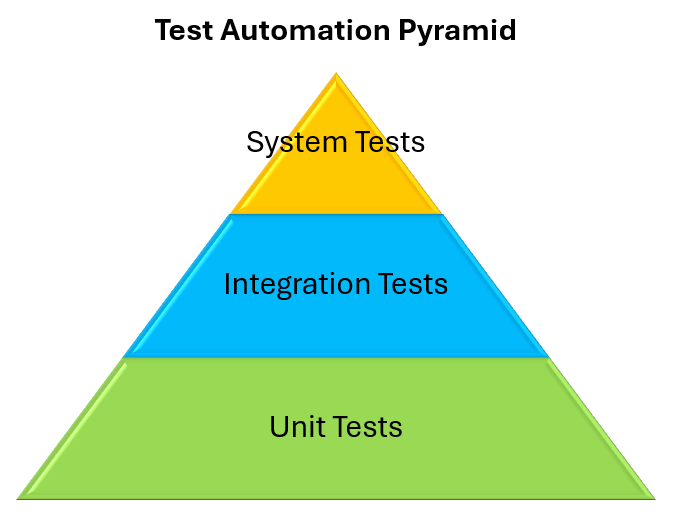
The project needs to reach at least 80% code coverage and include tests from all levels of the test automation pyramid:
8.10.1 Backend Tests Setup (pytest)
| Test Type | Tool | Scope |
|---|---|---|
| Unit tests | pytest, pytest-asyncio | Individual functions, services, models |
| Integration tests | pytest + SQLite test DB | Database repositories, API endpoints via TestClient |
| Architecture tests | pytestarch | Enforces architectural rules (layer dependencies, imports) |
| Code coverage | pytest-cov | Target: ≥80% |
Backend tests use SQLite as the test database (faster, no external dependencies) and are configured in pytest.ini with asyncio_mode = auto.
8.10.2 Frontend Tests Setup (Vitest + Playwright)
| Test Type | Tool | Scope |
|---|---|---|
| Unit tests | Vitest | Services (*.test.ts), stores (*.test.ts), utility functions |
| E2E tests | Playwright (Chromium) | Full browser-based user journeys: map page, login flow |
| Integration tests | Playwright (Chromium) | Test against a fullstack deployment (DB + backend + frontend) |
| Architecture tests | dependency-cruiser | Enforces architectural rules (dependencies, imports) |
| Code coverage | vitest | Target: ≥80% |
Playwright tests (*.e2e.ts and *.integration.ts) run against the production build, simulating real user interactions.
8.10.3 Unit Tests
The unit tests aim for a high branch and line coverage. The main focus lies on testing edge cases to catch errors due to abnormal inputs or conditions. To test a specific module without its dependencies mocking is used where required. The tests and test data are designed by the developers. The test data must make sense and add value to the tests suite by either specifying good or bad behaviour and testing edge cases. Each developer is responsible for adding tests for new functionalities to maintain a high code coverage with useful and adequate tests.
By formulating good and bad results of the function calls it is checked that the behaviour of the called function is not changed by a code change. This is done with black box tests in which only the inputs and outputs are compared and must be deterministic across runs.
The file names of the backend unit test files follows the following naming schema: test_<name of the file under test>.py
The file names of the frontend unit test files follows the following naming schema: <name of the file under test>.test.ts
8.10.4 Integration Tests
As integration tests are on a higher level than unit tests they combine different modules to system components. Integration tests validate the interaction between multiple modules and ensure that interfaces between components function correctly.
Integration tests are part of the automated CI tests suite.
8.10.5 E2E Tests
The End-to-End Tests are created with a tool called Playwright. Playwright enables us to automatically test the front end of our application via its chromium based browser. The browser is instructed to navigate through the frontend like a user would. Playwright then tests, if it behaves accordingly. To be independent of the backend, the backend is mocked. For each page we load the page and check, if the page contains the expected html response results. The results are checked based on so called "selectors".
8.10.6 Smoke Tests
A smoke test verifies that the application starts up and is reachable. The tests suite contains smoke tests for the gas station service to check the ongoing compatibility with the Tankerkönig API.
8.10.7 Penetration Tests
The backend penetration test strategy focuses on verifying the correct enforcement of authentication for all protected FastAPI endpoints. Since the application exposes user-specific and security-relevant data, such as fuel history records, exported user data, and station-related information, every non-public endpoint must reject requests that are not associated with a valid authenticated user. The main goal of these tests is therefore to ensure that no protected route can be accessed anonymously or with invalid credentials.
The implemented tests follow a lightweight but systematic approach. For each protected endpoint, an automated pytest test sends a request without an Authorization header and expects the backend to respond with either 401 Unauthorized or 403 Forbidden. A second test sends the same request with a malformed or invalid bearer token and again verifies that access is denied. Where an endpoint requires query parameters or a request body, the tests provide valid example input so that validation errors cannot hide authentication problems. This ensures that a successful response would clearly indicate a broken authentication check.
The actual backend test classes are grouped by router in the test_pentest.py file. The tests are intended to run as part of the automated test suite and CI pipeline, so newly introduced regressions in authentication behavior are detected early before deployment.
The test suite also flags any new and unclassified endpoints by iterating over all available endpoints. The project group agreed that every new endpoint must be classified and that the necessary tests must be developed if it is a protected endpoint.
8.10.7 Architecture Tests
Architecture tests ensure that certain namespaces are not allowed to import or use another namespace. This enforces separation of concerns and promotes modularity and abstraction.
The diagram below displays the allowed and forbidden namespace imports of the backend application. Routers form the entry point of the backend application and use services to provide functionality to callers.
The diagram below displays the most important allowed and forbidden namespace imports of the frontend application. Routes form the entry point of the frontend application and use services and stores to provide functionality routes. Components can be included into route pages and i18n supply everything with translated display text.
*The important rules are shown in the diagram above. All imports not explicitly shown in the diagram are not allowed.
8.10.8 GitHub CI Integration for Test Execution
The GitHub Pipeline executes the tests every time new code is pushed to an pull request in the repository. The tests suite contains unit tests, integration tests, system tests, architecture tests, E2E tests, performance tests and penetration tests. For extra insights into the system the pipeline triggers static code analysis with an external sonar qube instance as well. The pipeline fails and prevents merges in pull requests if any of the pipeline stages fail.
The pipeline test steps are split up between the front and backend to separate the concerns. The written tests are split up in different folders in the specific domain as well.
All tests are executed in GitHub Actions CI:
- test_backend.yml: pytest with coverage → coverage.xml
- test_frontend.yml: vitest with coverage → lcov.info + Playwright
- test_integration.yml: Playwright tests against a production compiled fullstack application deployment
- sonarcloud.yml: Aggregates both coverage reports for SonarCloud analysis
The results of the tests and static code analysis are added as a criteria for accepting pull request. A pull request may only be merged if all unit, integration, system, architecture, and static analysis checks pass successfully and the configured coverage threshold of 80% is reached.
Exit criteria for merging pull requests: |Description| |---| |All automated tests must pass.| |Coverage is greater than 80%.| |SonarQube does not flag any security issues or critical issues. Ranking SonarCube Score A on the given code changes is a pass.| |No architecture test rules are violated by the code changes.| |The code changes must be approved by a different project member.|
8.11 Code Quality
8.11.1 Static Analysis
Static code analysis with SonarQube creates metrics for checking the code quality. These metrics include: coverage, errors, common shortcomings, maintainability grade, cognitive complexity, number of functions per class, lines of code per class and package security analysis. The static code analysis is integrated in the GitHub pipeline. If SonarQube discovers issues, the pipeline fails and prevents the pull request from being merged.
The goal is to maintain high code quality, readability, maintainability, and security by following the quality standards enforced through SonarQube which takes industry standards into account.
Link to SonarQube Cloud: https://sonarcloud.io/project/overview?id=SQS-THRO_Tanker24
| Tool | Language | Checks |
|---|---|---|
| Ruff | Python | Linting, import sorting, code formatting |
| Mypy | Python | Static type checking (strict mode) |
| ESLint | TypeScript/JS | Code quality rules |
| Prettier | TypeScript/JS/CSS | Code formatting |
| SonarCloud | All | Comprehensive code quality analysis (bugs, smells, vulnerabilities, coverage, duplication) |
8.11.2 Quality Gate
SonarCloud is configured via sonar-project.properties and enforces:
- No new bugs or vulnerabilities
- Code coverage threshold
- Maintainability rating
- No duplicated code blocks
Results are displayed as badges in the README and block PR merges when the quality gate fails.
8.12 Interface Abstraction
8.12.1 Gas Station Data Provider
The GasStationService abstract base class defines the interface for gas station data providers:
class GasStationService(ABC):
    def get_gas_station_by_id(self, id: str) -> GasStation: ...
    def get_gas_stations(self, latitude, longitude, radius) -> List[GasStation]: ...
The current implementation, TankerkoenigGasStationService, communicates with the Tankerkönig REST API. This abstraction allows swapping to a different data provider (e.g., a self-hosted database replica) without changing the consuming services.
This enables the application to further increase it's robustness by adding a second alternative provider. The application is ready to implement a provider switch from Tankerkönig to any different one if the Tankerkönig REST api is unavailable. The application detects the unavailability via timeouts which prevent the application from freezing indefinitely. As Tankerkönig provides its API as best as they can the response times can vary.
8.12.2 Data Export
The ExportDataService abstract base class defines the interface for data export:
class ExportDataService(ABC):
    async def get_user_data(self, user_id: int) -> list[dict[str, Any]]: ...
Two implementations exist:
- NestedExportDataService: Returns hierarchical JSON (cars → history records)
- FlatExportDataService: Returns flat CSV-compatible rows (one row per history record with car details repeated)
More export types can be added as needed with varying data structures.
8.13 Privacy and Consent
The frontend implements a consent management system:
- ConsentModal: Displays privacy policy and requests user consent on first visit
- Privacy store ($lib/stores/privacy.ts): Manages consent state
- GDPR compliance: Privacy policy available at /privacy, legal imprint at /impressum
- No tracking: No third-party analytics or tracking cookies are used